notes:
for example, from this great movie waynes world
** play clip**
** stop after hairnets joke**
---
## Framing Devices Example
notes:
in this example, will see the intro from alfred hitchock presents, which was the introduction to every one of the episodes of the show
*play clip*
so, every week you would see this clip and alfred hitchock would introduce the stories for that week -- this provides *stability* for the viewer, i.e. they know what to expect after this little intro would run, that they were going to see a mystery and/or a spooky story
---
## Framing Devices Example
notes:
this is an intro to a video game called "Half Life"
one thing to see is that in this case you can move your head around, but you can't leave the train
another thing to see is that for the first two there was a strong element of 4th wall breaking -- the characters "step out" of the story to give us information, but here, accept for the credits, you are "in" the story for the whole time
but what you are getting, instead of an explanation is an *orientation* to the game -- an overview of the place and some background about the world around you
---
## Framing Devices
What do framing devices provide?
* Context -- Wayne's exposition
* Stability -- Alfred Hitchcock's weekly introduction
* Orientation -- Half Life's train trip
notes:
in each of these cases, the framing device played an important role in giving the user (1) the context of the story, (2) an understanding of what kind of story was going to be taking place, i.e. a sense of stability and/or (3) an overview of the setting and context of the story
---
## What is a framing device?
A technical-ish definition:
"A Framing Device (or Frame Story) is a narrative technique wherein a writer surrounds their primary story with a secondary one. In other words, they frame their main story with another story.
Framing Devices lead the audience into the larger narrative, oftentimes by having characters in the outer story tell the primary story in some way."
[ScreenCraft](https://screencraft.org/2021/09/15/everything-you-need-to-know-about-framing-devices/)
notes:
disclaimer, this is not my field BUT here's a good enough definition from ScreenCraft *read*
---
## What is a framing device?
A technical-ish definition:
"A Framing Device (or Frame Story) is a narrative technique wherein a writer surrounds their primary story with a secondary one. In other words, they frame their main story with another story.
Framing Devices lead the audience into the larger narrative, oftentimes by having characters in the outer story tell the primary story in some way."
[ScreenCraft](https://screencraft.org/2021/09/15/everything-you-need-to-know-about-framing-devices/)
OR
If a piece of art is the story, the frame would be the "framing device" (hence the name!).
notes:
another way to think about this in an even broader sense is that if you have a picture of artwork, this is the story, then the frame holding that artwork is this "framing device" that is used to place your story within
---
## Framing Devices - beyond introductions
notes:
so, the original examples we saw where for introductions to movies/video games, but framing devices can be "holders" of the full story as well
---
## Framing Devices - beyond introductions
 notes:
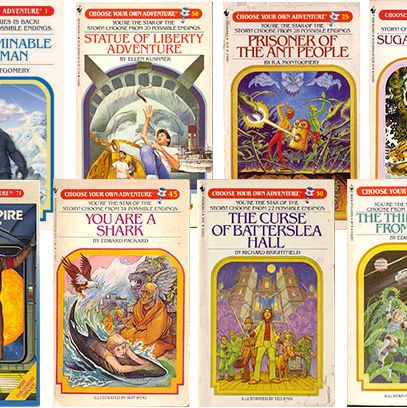
one older example is the "choose your own adventure" if anybody remembers those :)
in these, you would start off reading like a normal book, but then depending on what choices you make, you are told to go to different pages to continue the story and there by "choosing" your own ending
here you can think of the framing device as these set of choices, and the physical turning of pages to different parts of the book depending on these different choices
---
## Framing Devices - beyond introductions
notes:
one older example is the "choose your own adventure" if anybody remembers those :)
in these, you would start off reading like a normal book, but then depending on what choices you make, you are told to go to different pages to continue the story and there by "choosing" your own ending
here you can think of the framing device as these set of choices, and the physical turning of pages to different parts of the book depending on these different choices
---
## Framing Devices - beyond introductions
 notes:
a much newer example is netflix's bandersnatch in which you are watching an episode of blackmirror, but you are allowed to make decisions that determine the outcome
in this case, part of the framing device is the remote that you click that determines these choices
---
## Framing Device Choices
* data informed vs. data driven
* interactive vs. static
* guided vs. unguided
* audience
notes:
when we are chosing how to frame our data story to our audience, there are several choices we have to make
or sometimes these choices are determined by the kind of story we want to tell and the medium of telling
---
## Informing versus Driving
Do you want your audience to be able to recreate your input data? To make inferences? Or is it appropriate to focus on conveying broad ideas, without one-to-one mapping of information to visualization?
Our stories must be *honest*.
How can we relate this to thinking about inductive as opposed to deductive storytelling?
notes:
a much newer example is netflix's bandersnatch in which you are watching an episode of blackmirror, but you are allowed to make decisions that determine the outcome
in this case, part of the framing device is the remote that you click that determines these choices
---
## Framing Device Choices
* data informed vs. data driven
* interactive vs. static
* guided vs. unguided
* audience
notes:
when we are chosing how to frame our data story to our audience, there are several choices we have to make
or sometimes these choices are determined by the kind of story we want to tell and the medium of telling
---
## Informing versus Driving
Do you want your audience to be able to recreate your input data? To make inferences? Or is it appropriate to focus on conveying broad ideas, without one-to-one mapping of information to visualization?
Our stories must be *honest*.
How can we relate this to thinking about inductive as opposed to deductive storytelling?
 notes:
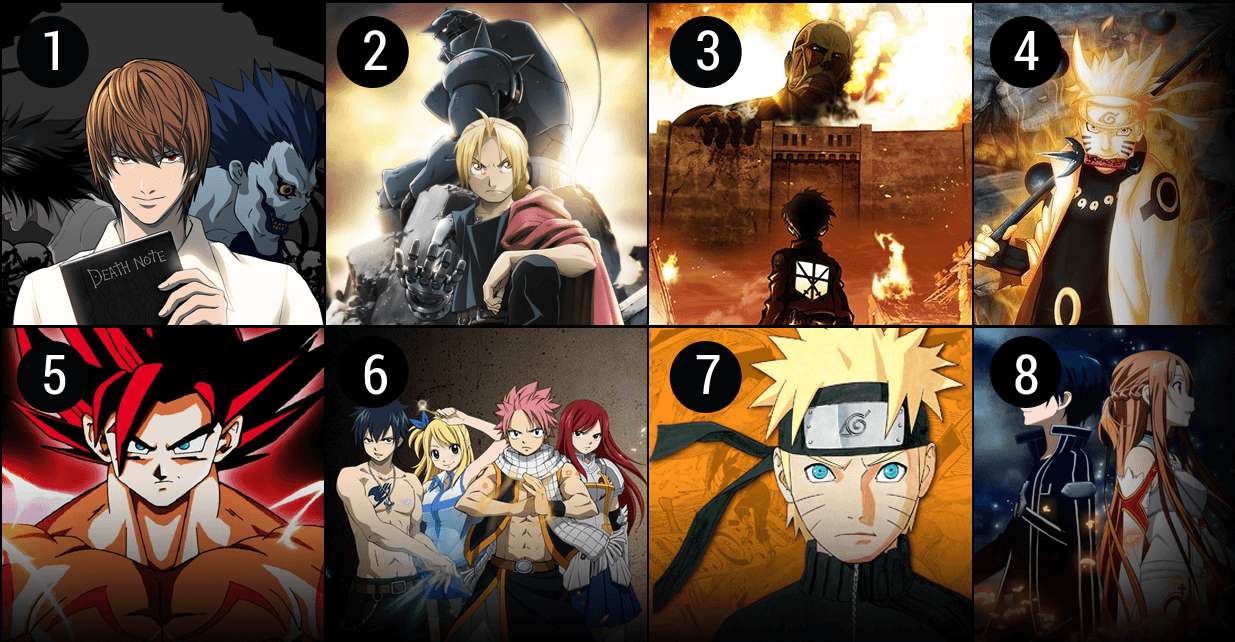
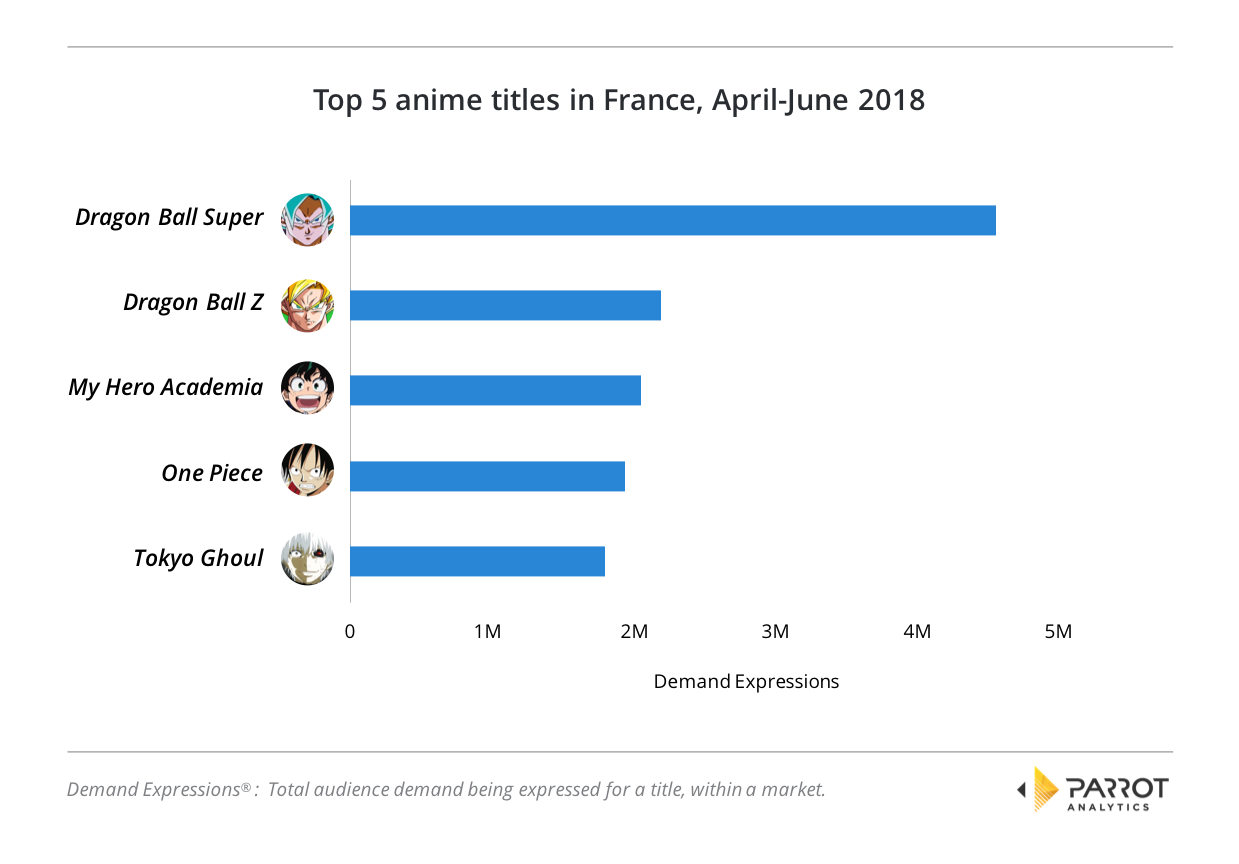
the distinction between data driven an data informed can be thought of a bit of as do you want your user to get a broad concept derived from data (data informed) OR do you want them to be able to recreate your graphs or visualizations/input data? (data driven)
on both the left and right we see a depiction of the popularity of some anime cartoons
on the left though, only little pictures showing which are the most popular -- we could not backtrack out what the data was here and make our own graph and try to figure things out like by *how much* is Death Note "winning" compared to (maybe?) Attack on Titan(?) (I am not an anime expert!)
on the right however, we have names of each and actual numbers (in the millions on the bottom). both of these show the popularity of anime over time periods, but you only get a "feel" for relative popularities on the left, you would need something like the graph on the right to actually get the data and remake on your own
---
## Storytelling Form: interactive vs static
* Narrative
* Navigable
* Hybrid
notes:
another decision we need to make is how much control do we want to give our audience in the exploration of the story?
* narrative: you go tell someone, or canned conversations in a game
* navigable: user is in control, more invested in some cases
* hybrid: spectrum! this is often what we will do -- for example with google data studio the user can have some control over the look of a graph, or the range of data in it, but they don't have control over what graphs are present in your report -- you do!
---
## Style of Story: Interactive/Navigable
Do we give the person control? How much control? What do we need to retain?
notes:
the distinction between data driven an data informed can be thought of a bit of as do you want your user to get a broad concept derived from data (data informed) OR do you want them to be able to recreate your graphs or visualizations/input data? (data driven)
on both the left and right we see a depiction of the popularity of some anime cartoons
on the left though, only little pictures showing which are the most popular -- we could not backtrack out what the data was here and make our own graph and try to figure things out like by *how much* is Death Note "winning" compared to (maybe?) Attack on Titan(?) (I am not an anime expert!)
on the right however, we have names of each and actual numbers (in the millions on the bottom). both of these show the popularity of anime over time periods, but you only get a "feel" for relative popularities on the left, you would need something like the graph on the right to actually get the data and remake on your own
---
## Storytelling Form: interactive vs static
* Narrative
* Navigable
* Hybrid
notes:
another decision we need to make is how much control do we want to give our audience in the exploration of the story?
* narrative: you go tell someone, or canned conversations in a game
* navigable: user is in control, more invested in some cases
* hybrid: spectrum! this is often what we will do -- for example with google data studio the user can have some control over the look of a graph, or the range of data in it, but they don't have control over what graphs are present in your report -- you do!
---
## Style of Story: Interactive/Navigable
Do we give the person control? How much control? What do we need to retain?
 notes:
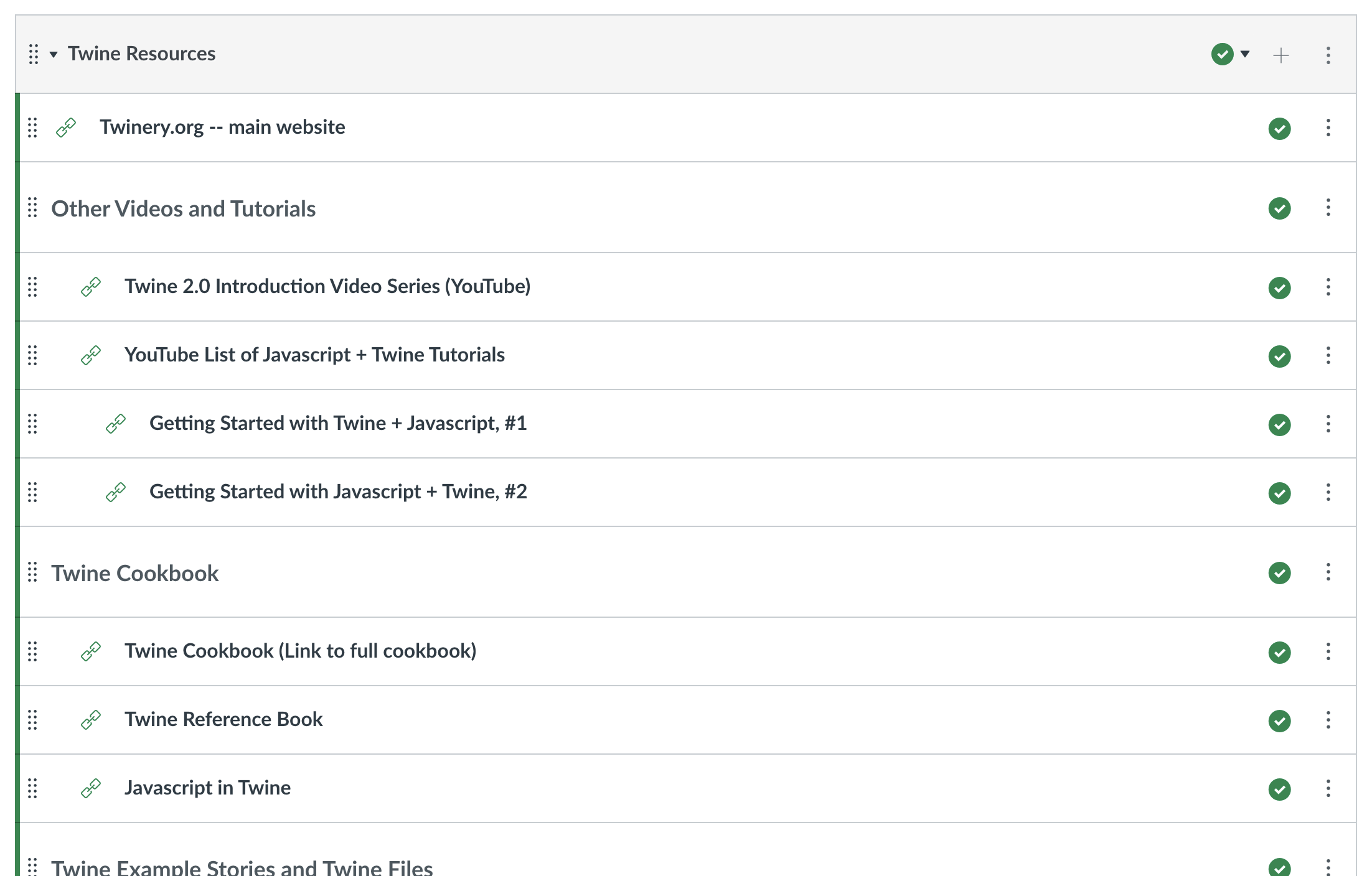
We have a set of resources for you to check out for twine -- while we won't be covering how to incorporate JavaScript in twine, there are a set of tutorials about how to do so at these resources, so feel free to check them out if you want to!
---
## Twine: Other Examples
* [Cat Petting Simulator](https://neongrey.itch.io/pet-that-cat)
* [Rainy Day](https://thaisa.itch.io/rainy-day)
* [Temple of No](https://itch.io/queue/c/314317/twine-examples?game_id=72357)
notes:
for temple of no -- be sure to click on the underlined words!
cat petting simulator might be down!
---
## Twine for Data Stories
Example of Twine for a Data Story is on Canvas
notes:
you are *not* required to use Twine for your final data story! this is just an example of a recorded version that uses it for audience interactivity
**play recorded data story!**
---
## To Twinery.org!
notes:
**do walkthrough example!**
-->
notes:
for example, from this great movie waynes world
** play clip**
** stop after hairnets joke**
---
## Framing Devices Example
notes:
in this example, will see the intro from alfred hitchock presents, which was the introduction to every one of the episodes of the show
*play clip*
so, every week you would see this clip and alfred hitchock would introduce the stories for that week -- this provides *stability* for the viewer, i.e. they know what to expect after this little intro would run, that they were going to see a mystery and/or a spooky story
---
## Framing Devices Example
notes:
this is an intro to a video game called "Half Life"
one thing to see is that in this case you can move your head around, but you can't leave the train
another thing to see is that for the first two there was a strong element of 4th wall breaking -- the characters "step out" of the story to give us information, but here, accept for the credits, you are "in" the story for the whole time
but what you are getting, instead of an explanation is an *orientation* to the game -- an overview of the place and some background about the world around you
---
## Framing Devices
What do framing devices provide?
* Context -- Wayne's exposition
* Stability -- Alfred Hitchcock's weekly introduction
* Orientation -- Half Life's train trip
notes:
in each of these cases, the framing device played an important role in giving the user (1) the context of the story, (2) an understanding of what kind of story was going to be taking place, i.e. a sense of stability and/or (3) an overview of the setting and context of the story
---
## What is a framing device?
A technical-ish definition:
"A Framing Device (or Frame Story) is a narrative technique wherein a writer surrounds their primary story with a secondary one. In other words, they frame their main story with another story.
Framing Devices lead the audience into the larger narrative, oftentimes by having characters in the outer story tell the primary story in some way."
[ScreenCraft](https://screencraft.org/2021/09/15/everything-you-need-to-know-about-framing-devices/)
notes:
disclaimer, this is not my field BUT here's a good enough definition from ScreenCraft *read*
---
## What is a framing device?
A technical-ish definition:
"A Framing Device (or Frame Story) is a narrative technique wherein a writer surrounds their primary story with a secondary one. In other words, they frame their main story with another story.
Framing Devices lead the audience into the larger narrative, oftentimes by having characters in the outer story tell the primary story in some way."
[ScreenCraft](https://screencraft.org/2021/09/15/everything-you-need-to-know-about-framing-devices/)
OR
If a piece of art is the story, the frame would be the "framing device" (hence the name!).
notes:
another way to think about this in an even broader sense is that if you have a picture of artwork, this is the story, then the frame holding that artwork is this "framing device" that is used to place your story within
---
## Framing Devices - beyond introductions
notes:
so, the original examples we saw where for introductions to movies/video games, but framing devices can be "holders" of the full story as well
---
## Framing Devices - beyond introductions
notes:
one older example is the "choose your own adventure" if anybody remembers those :)
in these, you would start off reading like a normal book, but then depending on what choices you make, you are told to go to different pages to continue the story and there by "choosing" your own ending
here you can think of the framing device as these set of choices, and the physical turning of pages to different parts of the book depending on these different choices
---
## Framing Devices - beyond introductions
notes:
a much newer example is netflix's bandersnatch in which you are watching an episode of blackmirror, but you are allowed to make decisions that determine the outcome
in this case, part of the framing device is the remote that you click that determines these choices
---
## Framing Device Choices
* data informed vs. data driven
* interactive vs. static
* guided vs. unguided
* audience
notes:
when we are chosing how to frame our data story to our audience, there are several choices we have to make
or sometimes these choices are determined by the kind of story we want to tell and the medium of telling
---
## Informing versus Driving
Do you want your audience to be able to recreate your input data? To make inferences? Or is it appropriate to focus on conveying broad ideas, without one-to-one mapping of information to visualization?
Our stories must be *honest*.
How can we relate this to thinking about inductive as opposed to deductive storytelling?
notes:
the distinction between data driven an data informed can be thought of a bit of as do you want your user to get a broad concept derived from data (data informed) OR do you want them to be able to recreate your graphs or visualizations/input data? (data driven)
on both the left and right we see a depiction of the popularity of some anime cartoons
on the left though, only little pictures showing which are the most popular -- we could not backtrack out what the data was here and make our own graph and try to figure things out like by *how much* is Death Note "winning" compared to (maybe?) Attack on Titan(?) (I am not an anime expert!)
on the right however, we have names of each and actual numbers (in the millions on the bottom). both of these show the popularity of anime over time periods, but you only get a "feel" for relative popularities on the left, you would need something like the graph on the right to actually get the data and remake on your own
---
## Storytelling Form: interactive vs static
* Narrative
* Navigable
* Hybrid
notes:
another decision we need to make is how much control do we want to give our audience in the exploration of the story?
* narrative: you go tell someone, or canned conversations in a game
* navigable: user is in control, more invested in some cases
* hybrid: spectrum! this is often what we will do -- for example with google data studio the user can have some control over the look of a graph, or the range of data in it, but they don't have control over what graphs are present in your report -- you do!
---
## Style of Story: Interactive/Navigable
Do we give the person control? How much control? What do we need to retain?
notes:
We have a set of resources for you to check out for twine -- while we won't be covering how to incorporate JavaScript in twine, there are a set of tutorials about how to do so at these resources, so feel free to check them out if you want to!
---
## Twine: Other Examples
* [Cat Petting Simulator](https://neongrey.itch.io/pet-that-cat)
* [Rainy Day](https://thaisa.itch.io/rainy-day)
* [Temple of No](https://itch.io/queue/c/314317/twine-examples?game_id=72357)
notes:
for temple of no -- be sure to click on the underlined words!
cat petting simulator might be down!
---
## Twine for Data Stories
Example of Twine for a Data Story is on Canvas
notes:
you are *not* required to use Twine for your final data story! this is just an example of a recorded version that uses it for audience interactivity
**play recorded data story!**
---
## To Twinery.org!
notes:
**do walkthrough example!**
-->
notes:
We have a set of resources for you to check out for twine -- while we won't be covering how to incorporate JavaScript in twine, there are a set of tutorials about how to do so at these resources, so feel free to check them out if you want to!
---
## Twine: Other Examples
* [Cat Petting Simulator](https://neongrey.itch.io/pet-that-cat)
* [Rainy Day](https://thaisa.itch.io/rainy-day)
* [Temple of No](https://itch.io/queue/c/314317/twine-examples?game_id=72357)
notes:
for temple of no -- be sure to click on the underlined words!
cat petting simulator might be down!
---
## Twine for Data Stories
Example of Twine for a Data Story is on Canvas
notes:
you are *not* required to use Twine for your final data story! this is just an example of a recorded version that uses it for audience interactivity
**play recorded data story!**
---
## To Twinery.org!
notes:
**do walkthrough example!**
-->
notes:
for example, from this great movie waynes world
** play clip**
** stop after hairnets joke**
---
## Framing Devices Example
notes:
in this example, will see the intro from alfred hitchock presents, which was the introduction to every one of the episodes of the show
*play clip*
so, every week you would see this clip and alfred hitchock would introduce the stories for that week -- this provides *stability* for the viewer, i.e. they know what to expect after this little intro would run, that they were going to see a mystery and/or a spooky story
---
## Framing Devices Example
notes:
this is an intro to a video game called "Half Life"
one thing to see is that in this case you can move your head around, but you can't leave the train
another thing to see is that for the first two there was a strong element of 4th wall breaking -- the characters "step out" of the story to give us information, but here, accept for the credits, you are "in" the story for the whole time
but what you are getting, instead of an explanation is an *orientation* to the game -- an overview of the place and some background about the world around you
---
## Framing Devices
What do framing devices provide?
* Context -- Wayne's exposition
* Stability -- Alfred Hitchcock's weekly introduction
* Orientation -- Half Life's train trip
notes:
in each of these cases, the framing device played an important role in giving the user (1) the context of the story, (2) an understanding of what kind of story was going to be taking place, i.e. a sense of stability and/or (3) an overview of the setting and context of the story
---
## What is a framing device?
A technical-ish definition:
"A Framing Device (or Frame Story) is a narrative technique wherein a writer surrounds their primary story with a secondary one. In other words, they frame their main story with another story.
Framing Devices lead the audience into the larger narrative, oftentimes by having characters in the outer story tell the primary story in some way."
[ScreenCraft](https://screencraft.org/2021/09/15/everything-you-need-to-know-about-framing-devices/)
notes:
disclaimer, this is not my field BUT here's a good enough definition from ScreenCraft *read*
---
## What is a framing device?
A technical-ish definition:
"A Framing Device (or Frame Story) is a narrative technique wherein a writer surrounds their primary story with a secondary one. In other words, they frame their main story with another story.
Framing Devices lead the audience into the larger narrative, oftentimes by having characters in the outer story tell the primary story in some way."
[ScreenCraft](https://screencraft.org/2021/09/15/everything-you-need-to-know-about-framing-devices/)
OR
If a piece of art is the story, the frame would be the "framing device" (hence the name!).
notes:
another way to think about this in an even broader sense is that if you have a picture of artwork, this is the story, then the frame holding that artwork is this "framing device" that is used to place your story within
---
## Framing Devices - beyond introductions
notes:
so, the original examples we saw where for introductions to movies/video games, but framing devices can be "holders" of the full story as well
---
## Framing Devices - beyond introductions
notes:
one older example is the "choose your own adventure" if anybody remembers those :)
in these, you would start off reading like a normal book, but then depending on what choices you make, you are told to go to different pages to continue the story and there by "choosing" your own ending
here you can think of the framing device as these set of choices, and the physical turning of pages to different parts of the book depending on these different choices
---
## Framing Devices - beyond introductions
notes:
a much newer example is netflix's bandersnatch in which you are watching an episode of blackmirror, but you are allowed to make decisions that determine the outcome
in this case, part of the framing device is the remote that you click that determines these choices
---
## Framing Device Choices
* data informed vs. data driven
* interactive vs. static
* guided vs. unguided
* audience
notes:
when we are chosing how to frame our data story to our audience, there are several choices we have to make
or sometimes these choices are determined by the kind of story we want to tell and the medium of telling
---
## Informing versus Driving
Do you want your audience to be able to recreate your input data? To make inferences? Or is it appropriate to focus on conveying broad ideas, without one-to-one mapping of information to visualization?
Our stories must be *honest*.
How can we relate this to thinking about inductive as opposed to deductive storytelling?
notes:
the distinction between data driven an data informed can be thought of a bit of as do you want your user to get a broad concept derived from data (data informed) OR do you want them to be able to recreate your graphs or visualizations/input data? (data driven)
on both the left and right we see a depiction of the popularity of some anime cartoons
on the left though, only little pictures showing which are the most popular -- we could not backtrack out what the data was here and make our own graph and try to figure things out like by *how much* is Death Note "winning" compared to (maybe?) Attack on Titan(?) (I am not an anime expert!)
on the right however, we have names of each and actual numbers (in the millions on the bottom). both of these show the popularity of anime over time periods, but you only get a "feel" for relative popularities on the left, you would need something like the graph on the right to actually get the data and remake on your own
---
## Storytelling Form: interactive vs static
* Narrative
* Navigable
* Hybrid
notes:
another decision we need to make is how much control do we want to give our audience in the exploration of the story?
* narrative: you go tell someone, or canned conversations in a game
* navigable: user is in control, more invested in some cases
* hybrid: spectrum! this is often what we will do -- for example with google data studio the user can have some control over the look of a graph, or the range of data in it, but they don't have control over what graphs are present in your report -- you do!
---
## Style of Story: Interactive/Navigable
Do we give the person control? How much control? What do we need to retain?
notes:
We have a set of resources for you to check out for twine -- while we won't be covering how to incorporate JavaScript in twine, there are a set of tutorials about how to do so at these resources, so feel free to check them out if you want to!
---
## Twine: Other Examples
* [Cat Petting Simulator](https://neongrey.itch.io/pet-that-cat)
* [Rainy Day](https://thaisa.itch.io/rainy-day)
* [Temple of No](https://itch.io/queue/c/314317/twine-examples?game_id=72357)
notes:
for temple of no -- be sure to click on the underlined words!
cat petting simulator might be down!
---
## Twine for Data Stories
Example of Twine for a Data Story is on Canvas
notes:
you are *not* required to use Twine for your final data story! this is just an example of a recorded version that uses it for audience interactivity
**play recorded data story!**
---
## To Twinery.org!
notes:
**do walkthrough example!**
-->
- Causality: Do we want to start en media res? Are we just experiencing a bunch of events that happen to occur?
- Control: How many degrees of freedom do we provide? When does it become confusing? Is it sequential, random access, or a hybrid?
- Connection: Does the experience (the teller) enable a connection between the data (the tale) and the viewer (the told)?
notes:
We have a set of resources for you to check out for twine -- while we won't be covering how to incorporate JavaScript in twine, there are a set of tutorials about how to do so at these resources, so feel free to check them out if you want to!
---
## Twine: Other Examples
* [Cat Petting Simulator](https://neongrey.itch.io/pet-that-cat)
* [Rainy Day](https://thaisa.itch.io/rainy-day)
* [Temple of No](https://itch.io/queue/c/314317/twine-examples?game_id=72357)
notes:
for temple of no -- be sure to click on the underlined words!
cat petting simulator might be down!
---
## Twine for Data Stories
Example of Twine for a Data Story is on Canvas
notes:
you are *not* required to use Twine for your final data story! this is just an example of a recorded version that uses it for audience interactivity
**play recorded data story!**
---
## To Twinery.org!
notes:
**do walkthrough example!**
-->
notes:
for example, from this great movie waynes world
** play clip**
** stop after hairnets joke**
---
## Framing Devices Example
notes:
in this example, will see the intro from alfred hitchock presents, which was the introduction to every one of the episodes of the show
*play clip*
so, every week you would see this clip and alfred hitchock would introduce the stories for that week -- this provides *stability* for the viewer, i.e. they know what to expect after this little intro would run, that they were going to see a mystery and/or a spooky story
---
## Framing Devices Example
notes:
this is an intro to a video game called "Half Life"
one thing to see is that in this case you can move your head around, but you can't leave the train
another thing to see is that for the first two there was a strong element of 4th wall breaking -- the characters "step out" of the story to give us information, but here, accept for the credits, you are "in" the story for the whole time
but what you are getting, instead of an explanation is an *orientation* to the game -- an overview of the place and some background about the world around you
---
## Framing Devices
What do framing devices provide?
* Context -- Wayne's exposition
* Stability -- Alfred Hitchcock's weekly introduction
* Orientation -- Half Life's train trip
notes:
in each of these cases, the framing device played an important role in giving the user (1) the context of the story, (2) an understanding of what kind of story was going to be taking place, i.e. a sense of stability and/or (3) an overview of the setting and context of the story
---
## What is a framing device?
A technical-ish definition:
"A Framing Device (or Frame Story) is a narrative technique wherein a writer surrounds their primary story with a secondary one. In other words, they frame their main story with another story.
Framing Devices lead the audience into the larger narrative, oftentimes by having characters in the outer story tell the primary story in some way."
[ScreenCraft](https://screencraft.org/2021/09/15/everything-you-need-to-know-about-framing-devices/)
notes:
disclaimer, this is not my field BUT here's a good enough definition from ScreenCraft *read*
---
## What is a framing device?
A technical-ish definition:
"A Framing Device (or Frame Story) is a narrative technique wherein a writer surrounds their primary story with a secondary one. In other words, they frame their main story with another story.
Framing Devices lead the audience into the larger narrative, oftentimes by having characters in the outer story tell the primary story in some way."
[ScreenCraft](https://screencraft.org/2021/09/15/everything-you-need-to-know-about-framing-devices/)
OR
If a piece of art is the story, the frame would be the "framing device" (hence the name!).
notes:
another way to think about this in an even broader sense is that if you have a picture of artwork, this is the story, then the frame holding that artwork is this "framing device" that is used to place your story within
---
## Framing Devices - beyond introductions
notes:
so, the original examples we saw where for introductions to movies/video games, but framing devices can be "holders" of the full story as well
---
## Framing Devices - beyond introductions
- Causality: Do we want to start en media res? Are we just experiencing a bunch of events that happen to occur?
- Control: How many degrees of freedom do we provide? When does it become confusing? Is it sequential, random access, or a hybrid?
- Connection: Does the experience (the teller) enable a connection between the data (the tale) and the viewer (the told)?
notes:
We have a set of resources for you to check out for twine -- while we won't be covering how to incorporate JavaScript in twine, there are a set of tutorials about how to do so at these resources, so feel free to check them out if you want to!
---
## Twine: Other Examples
* [Cat Petting Simulator](https://neongrey.itch.io/pet-that-cat)
* [Rainy Day](https://thaisa.itch.io/rainy-day)
* [Temple of No](https://itch.io/queue/c/314317/twine-examples?game_id=72357)
notes:
for temple of no -- be sure to click on the underlined words!
cat petting simulator might be down!
---
## Twine for Data Stories
Example of Twine for a Data Story is on Canvas
notes:
you are *not* required to use Twine for your final data story! this is just an example of a recorded version that uses it for audience interactivity
**play recorded data story!**
---
## To Twinery.org!
notes:
**do walkthrough example!**
-->